The AI doesn't just see a diagram.
It sees the model.
Every DrawMode diagram sits on an underlying model, so the agentic AI assistant understands your system. It's more than a pretty face: the assistant works on the same diagram you do — building, reading, explaining and refactoring real models, using the collaborative team infrastructure.
Analyze your systems with a prompt.
Connect Claude Code or Codex over MCP and your coding agent works on the same diagrams you do. It reads the model, not a picture: every element, relationship and constraint, typed. It draws new diagrams, edits yours by id, renders them to check its own work and asks what changed since it last looked.
- Point it at a codebase and get its architecture back — packages, layers, classes, sequences
- Ask it to explain what it is building, and get a diagram rather than a wall of text
- Its edits land live on your canvas, each stretch as one undoable step beside your own
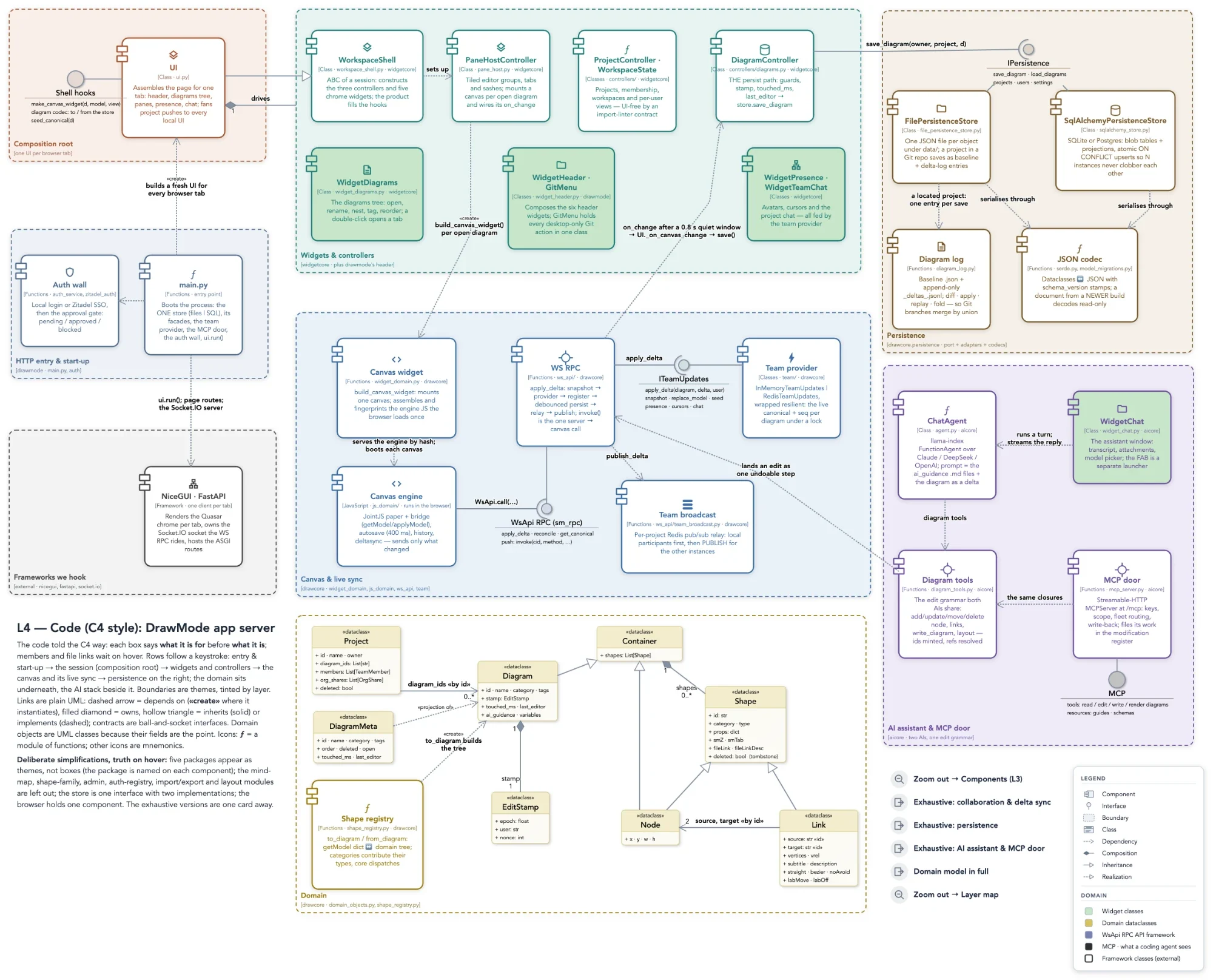
DrawMode drawn by Claude Code — asked over MCP for a C4 component diagram of DrawMode with its UML domain model.
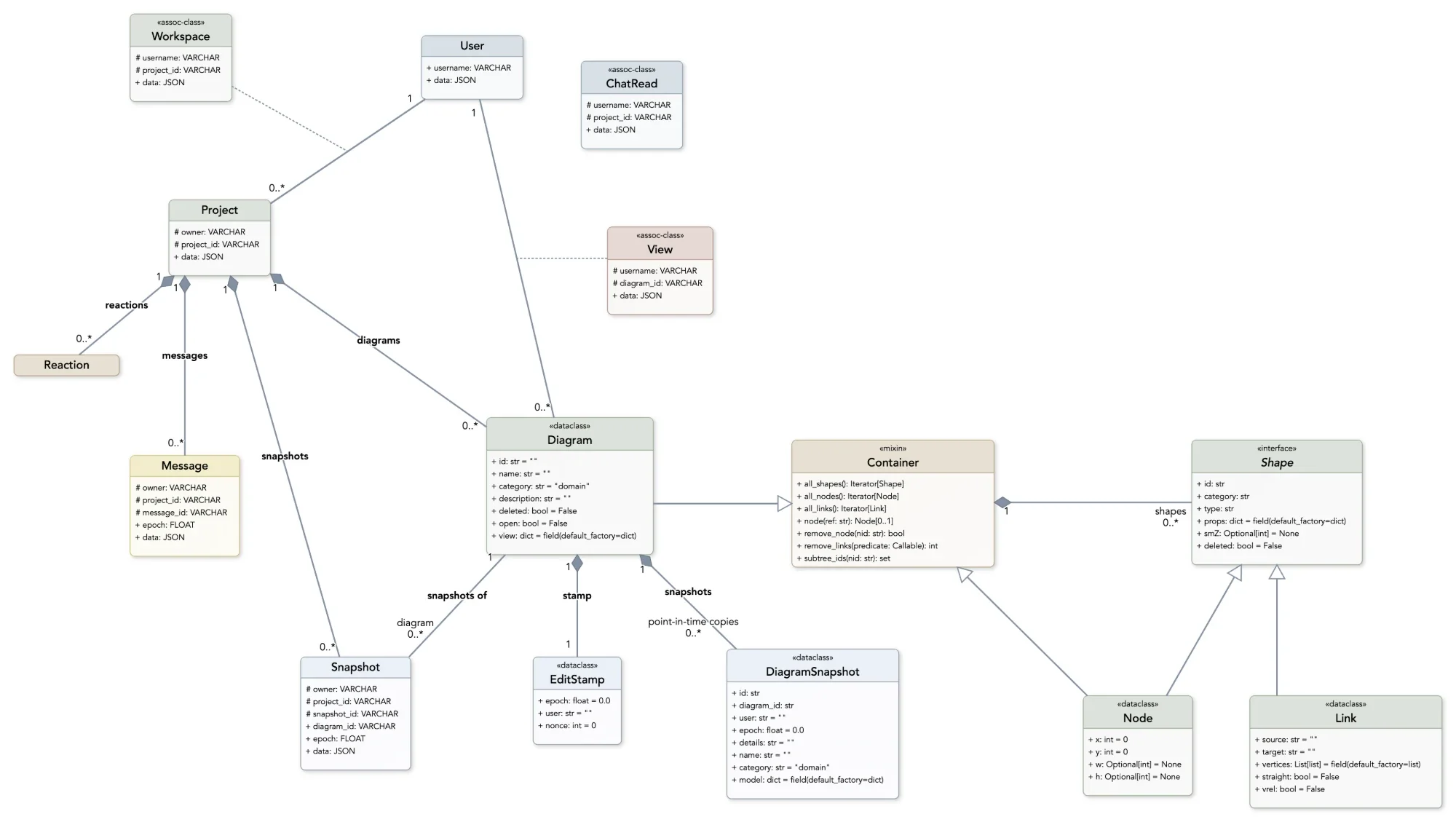
The domain model we told Claude Code to use — drawn first, then built.
Direct the agent.
It works the other way round, too. Draw the model you mean to build — the classes, the relationships, the constraints — and ask the agent to implement it. As you build together it keeps the diagram current with what it wrote, and you keep it current with what you want next. The model is the brief, and it stays the brief.
- A diagram precise enough to build from, and plain enough to argue over first
- Change the model and ask the agent to follow — or ask it to redraw the model from the code
- Every change, yours or the agent's, is in the register
Behaviour, not just structure.
Ask how something complex actually happens and the agent walks the code and draws the sequence: the lifelines, the calls in order, the optional and alternative paths. Each step it draws can carry a link to the source file and line it came from, so the diagram opens the code.
- Sequence, state and flow diagrams as readily as structure
- Source links on the shapes — click a message and land on the line that sends it
- Explain, then refine: ask why a step happens and the answer lands on the diagram
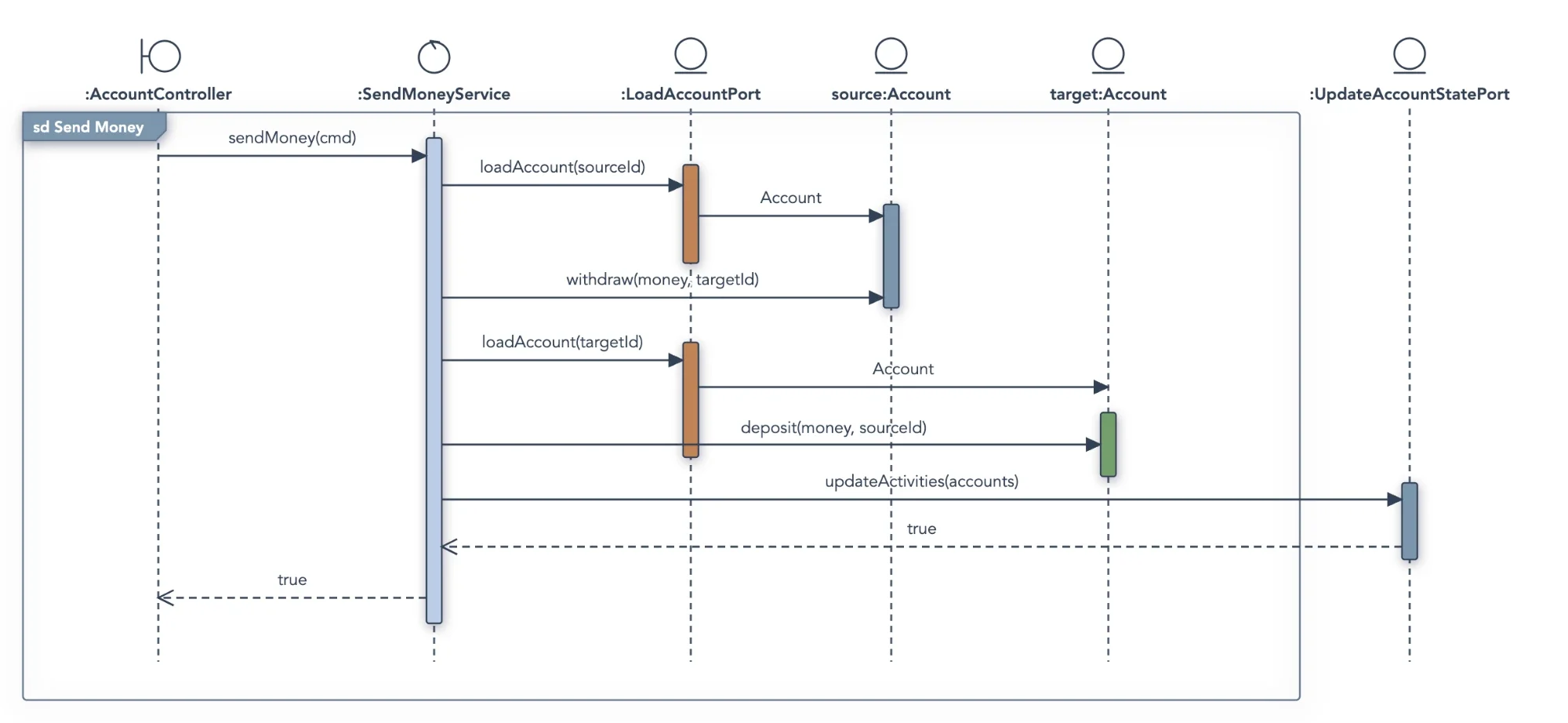
From an ordering system: asked to explain how money is sent, Claude Code drew the sequence — each step linked to its source.
claude mcp add drawmode 'https://app.drawmode.ai/mcp?project=…' \
  --transport http --header "Authorization: Bearer dmk_…"
Codex
[mcp_servers.drawmode]
url = "https://app.drawmode.ai/mcp?project=…"
bearer_token_env_var = "DRAWMODE_MCP_KEY"
Connected in a minute.
In the app, MCP ▸ Connection keys… gives each project a URL and a key, and writes out the exact line for your agent: one command for Claude Code, a few lines of config for Codex, and the plain facts for anything else that speaks MCP. The agent then works from its own terminal while you watch the canvas.
On DrawMode Desktop the door is local to your machine, with nothing to key. MCP is part of the Professional plan, and every new account's 14-day trial includes it.
Everyone's work on the record
The register files every stretch of work by who did it and why — Claude Code, Codex, Orville and you alike. Click an entry to see the shapes it touched; ask the agent what changed since.
Code and model, linked
An agent can pin a shape to the file and line it came from, so a class in the diagram opens the class in your editor — and the next question starts from the code.
Your library, its library
Vectorize your standards and design notes and the agent searches them through the same door, so what it draws is grounded in what your documents actually say.

Orville the Owl is DrawMode's built-in AI assistant. He collaborates on your diagrams as another team member — with his own edits, his own undo and his own place in the register.
He's fast, too. Orville is built around DrawMode's deltas: he reads what changed since his last turn rather than the whole diagram again, and he's extremely capable — he can access the web, your personal library and images. And he's not alone — start up to four owls working at the same time, Orville, Wilbur, Katharine and Violeta, each on a task of their own.
You describe it. Orville draws it.
Ask for a diagram and the owls lay out a real, editable model — then keep working on it with you: extend it, restructure it, question it. Sketch the rough shape by hand and hand it over for the rigour, or start from a prompt and refine by dragging.
- Create a mind map, class model or state machine from a sentence
- Reverse-engineer a class model from code you paste in
- Ask "what's missing?" — it reasons about the design, not the pixels
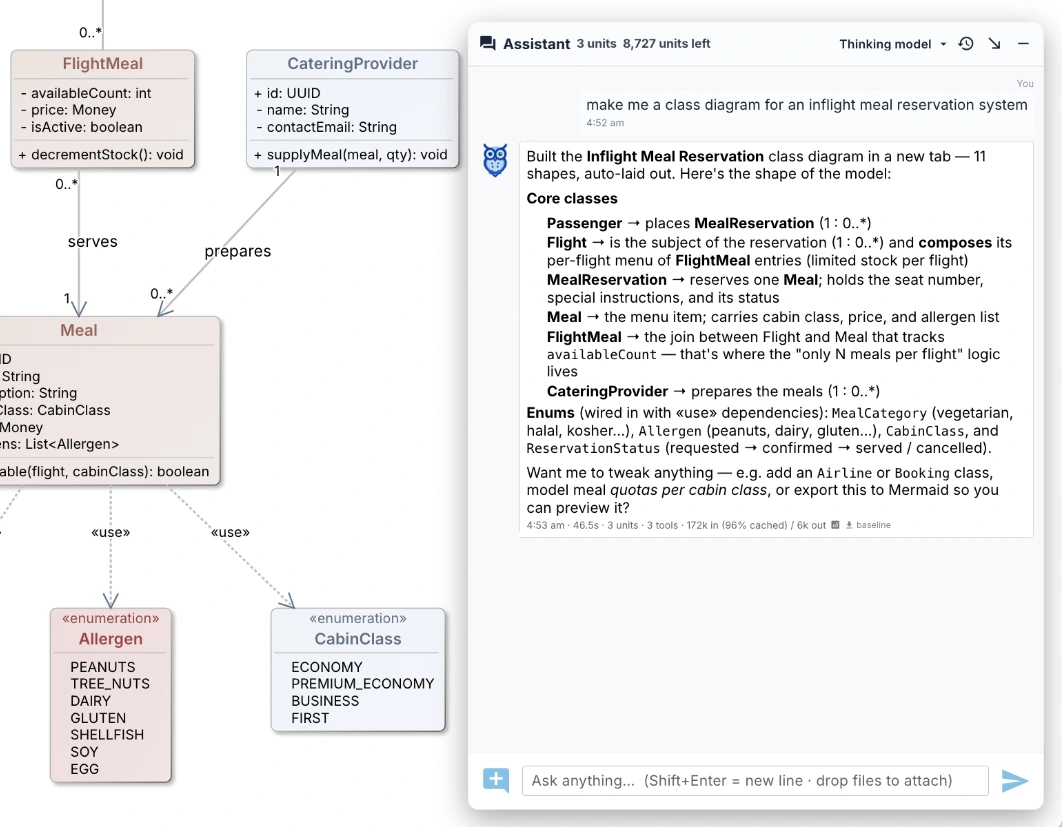
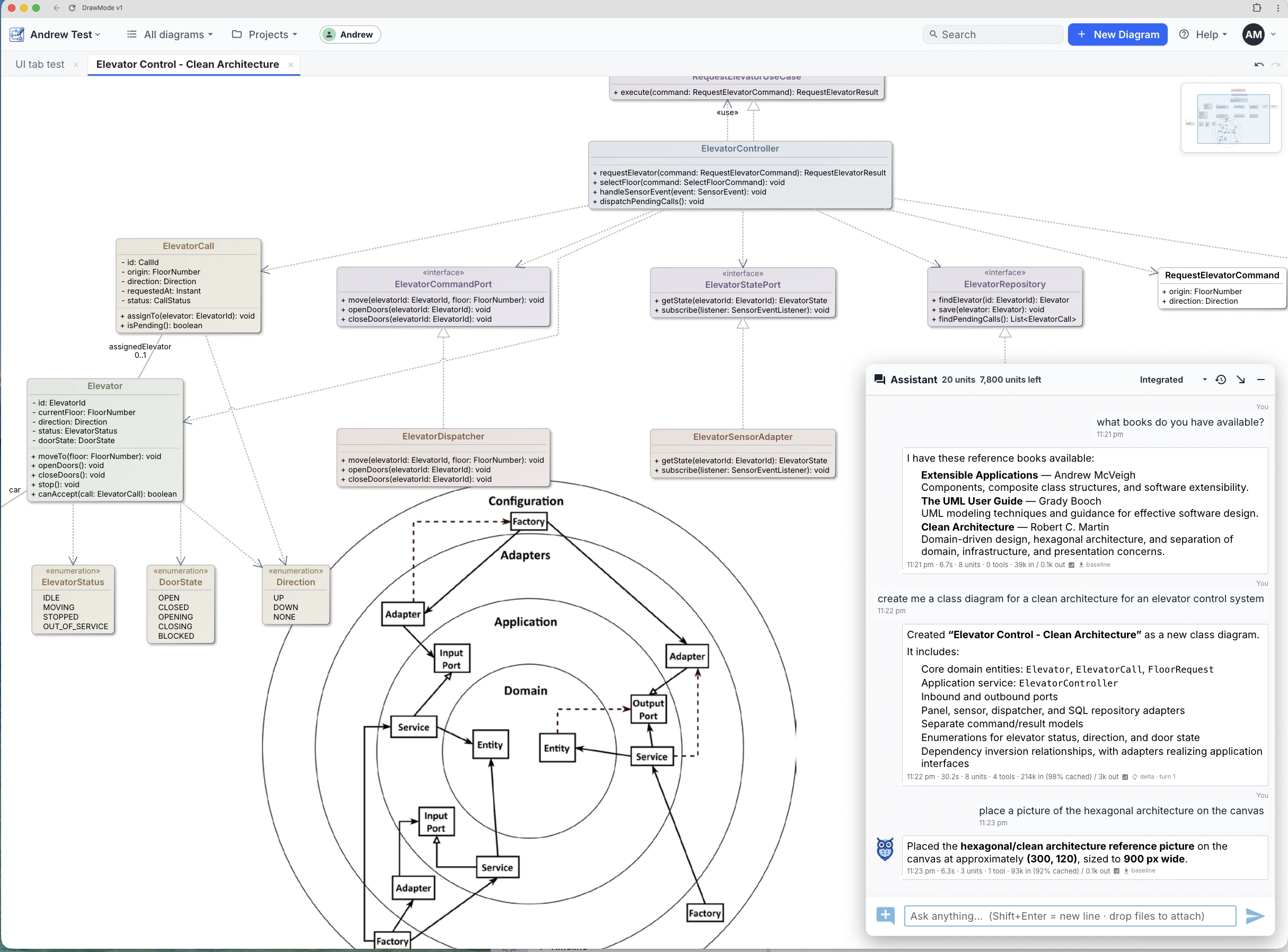
Orville is super smart
Vectorize your own documents — specs, standards, design notes, papers — and the owls read them the way they read your diagrams. Ask a question and they answer from your material, not from the internet's average opinion; ask for a diagram and they draw one grounded in what your documents actually say.
On the web with Professional, and unlimited on DrawMode Desktop, where your library never leaves your machine.
Orville creates more than diagrams
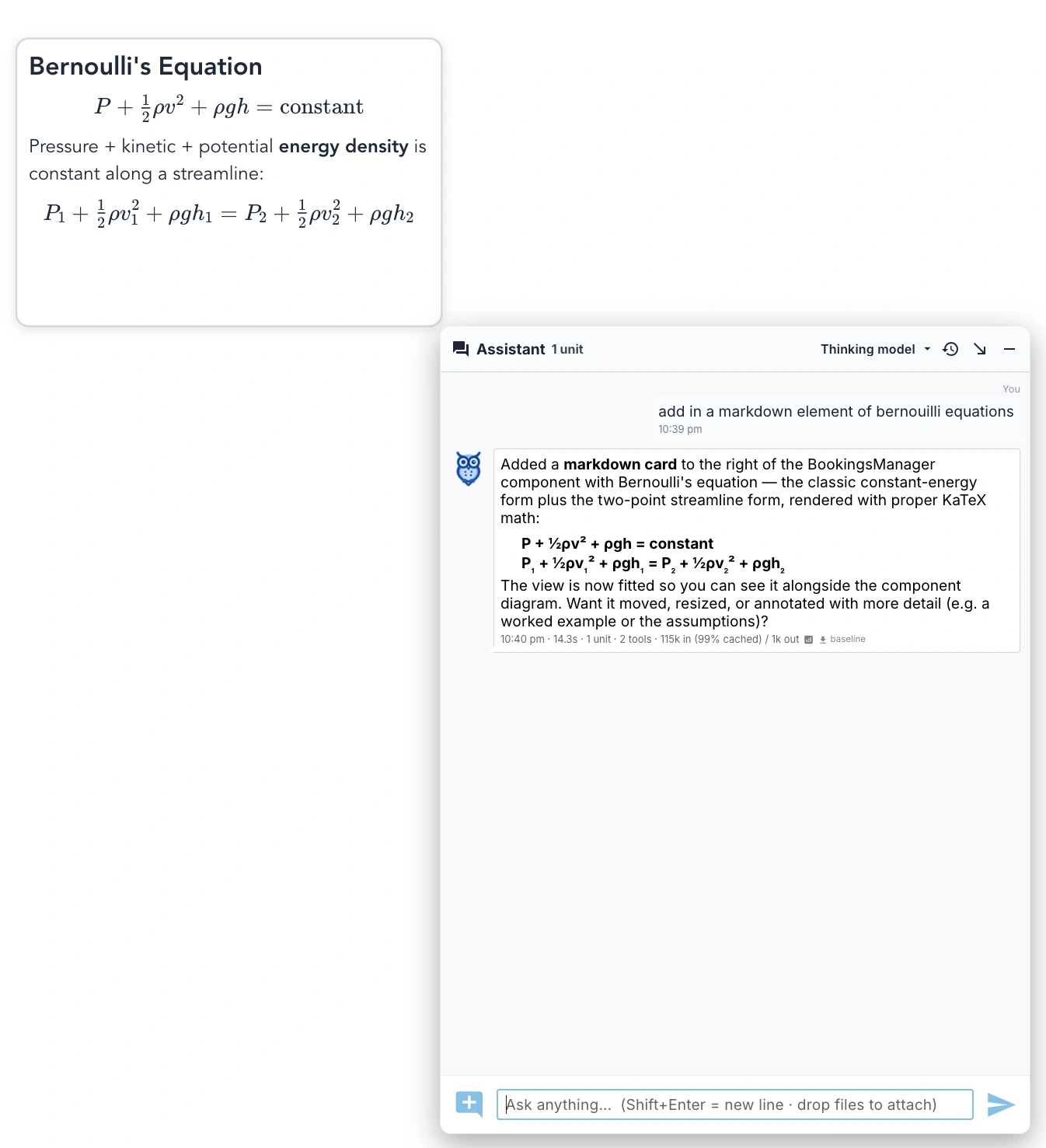
The owls don't stop at boxes and lines. Ask for the reasoning behind a design — a specification, a worked example, a derivation — and they write rich Markdown notes, KaTeX equations included, straight onto the canvas beside the model they explain.
The diagram and its thinking live on one page.
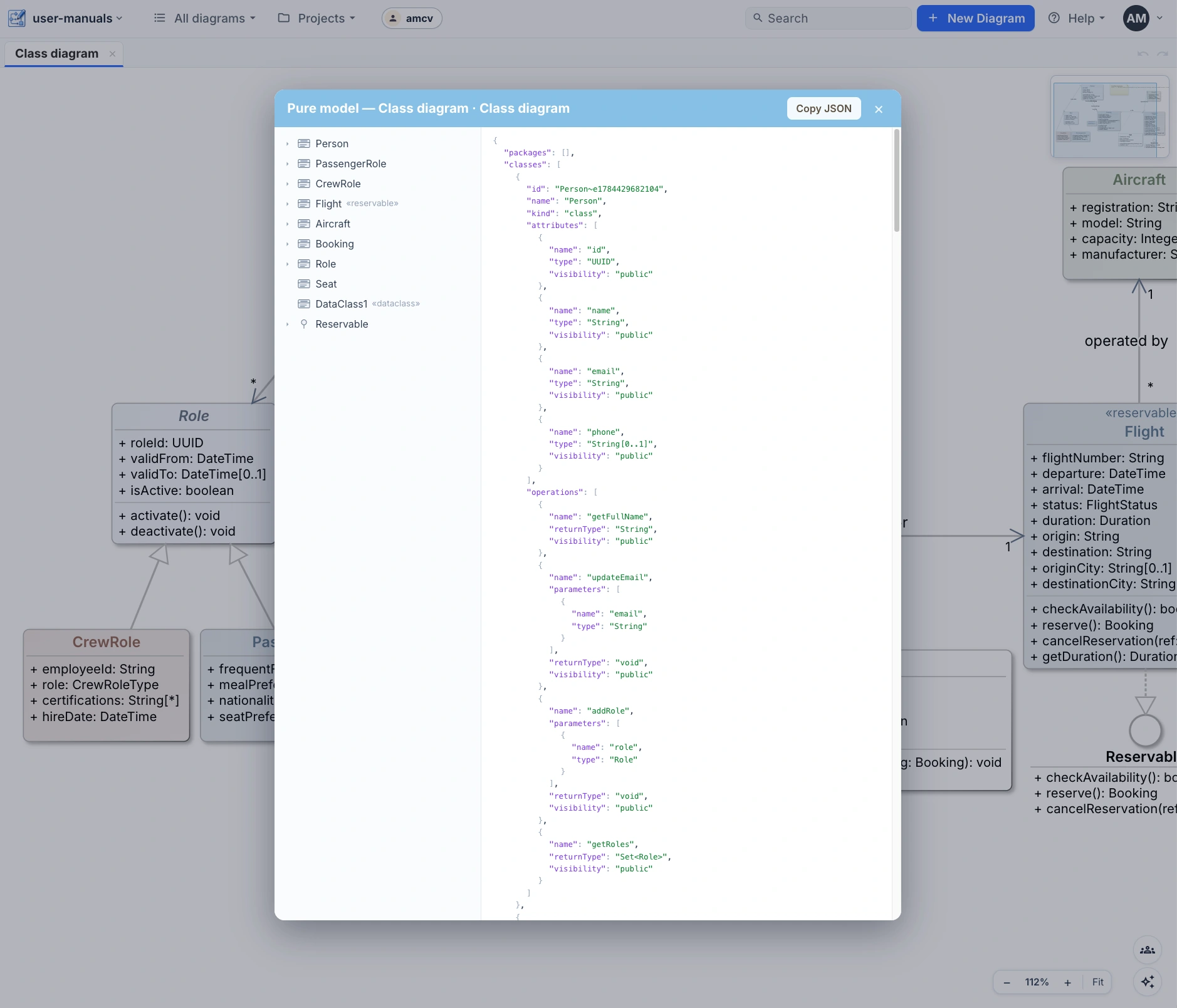
A model tools can read
Everything the owls see, you can export: the pure model — every type, relationship and constraint, with the cosmetic layer of coordinates and colour stripped away. A clean, typed structure for code generators and downstream AI.
Diagrams also round-trip as plain text — Mermaid, PlantUML and OPML — so models move cleanly between your repo, your docs and other tools.
 SpecMode
Coming early ’27
SpecMode
Coming early ’27
Draw the system.
Let the agents build it.
DrawMode today is a place to think. Where we're taking it is bigger: the shared model between you, your AI tools and your code — the description a system is built from, reflecting the reality of what it is, in powerful ways. Not the picture drawn after.
DrawMode is the base for SpecMode — where a human doesn't just draw the system but describes, constrains and specifies it, setting the guard rails the agents build within. And the mirror works both ways: SpecMode reflects diagrams back showing how the system actually works, so your mental model and your AI assistant's are the same picture.
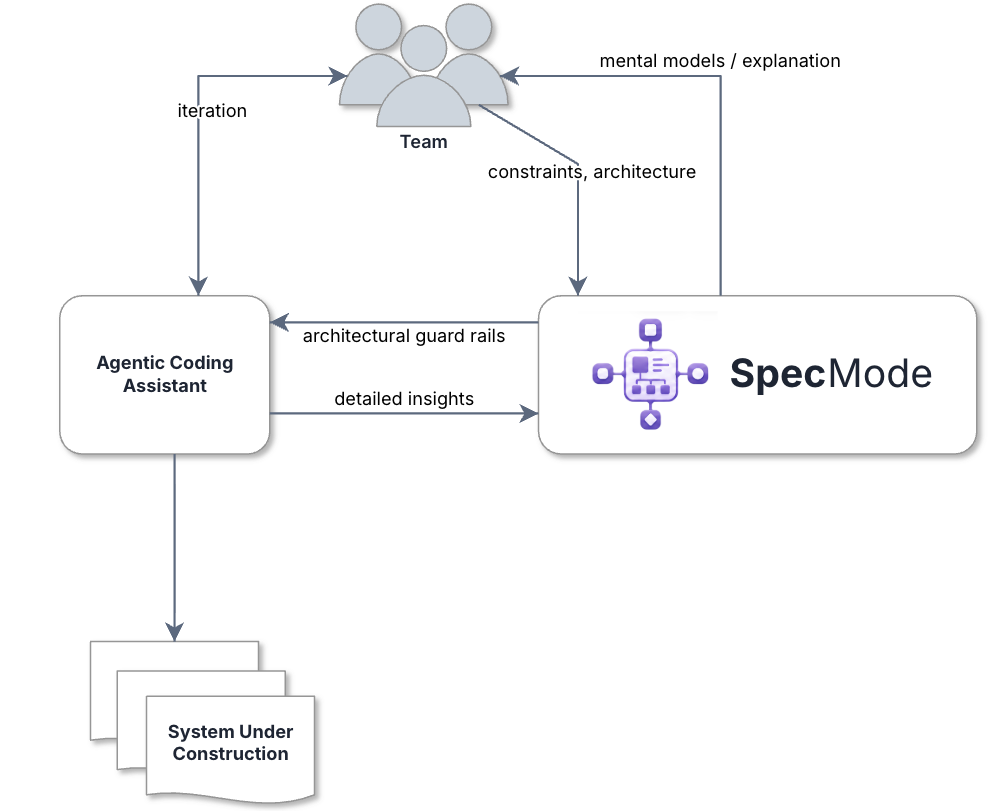
SpecMode in the loop: the team constrains and specifies, the agents build, and the understanding flows back.
A spec agents can build from
A DrawMode diagram is a real model — types, relationships, constraints. That makes it precise enough for an agentic coding assistant to implement, and human enough for your team to argue over first. Agree on the drawing; hand it to the agent; get software.
AI that draws its thinking
When an agent proposes a change, it shouldn't hand you four thousand lines of diff. It should hand you a diagram — its mental model of your system, and exactly what it intends to do to it. You review a picture you can disagree with.
See what your agents build
Agentic assistants produce a lot of code, fast. DrawMode keeps a live architecture view over your local codebase — so you can see the system they're actually creating, and catch the drift the day it starts, not the quarter after.
The plumbing is MCP
DrawMode speaks the Model Context Protocol: tools any agentic assistant can call to read your models, write them, and draw architecture views of your codebase. Claude Code, Codex or whatever you run — if it speaks MCP, it can draw with you.
Draw with a collaborator that gets it.
The owls are built in — describe a system on the canvas and watch it take shape.